
Waves in MAMAY: the wave count and the screener
Short version for experts: tables, lists and screenshots only.
Words in this lesson (8)
The wave count on the chart
MAMAY counts waves automatically and strictly by the rules: a count that breaks the hard rules isn't shown. The count is pinned — it isn't redrawn on every candle and changes only when an invalidation has triggered or a new pattern has appeared.
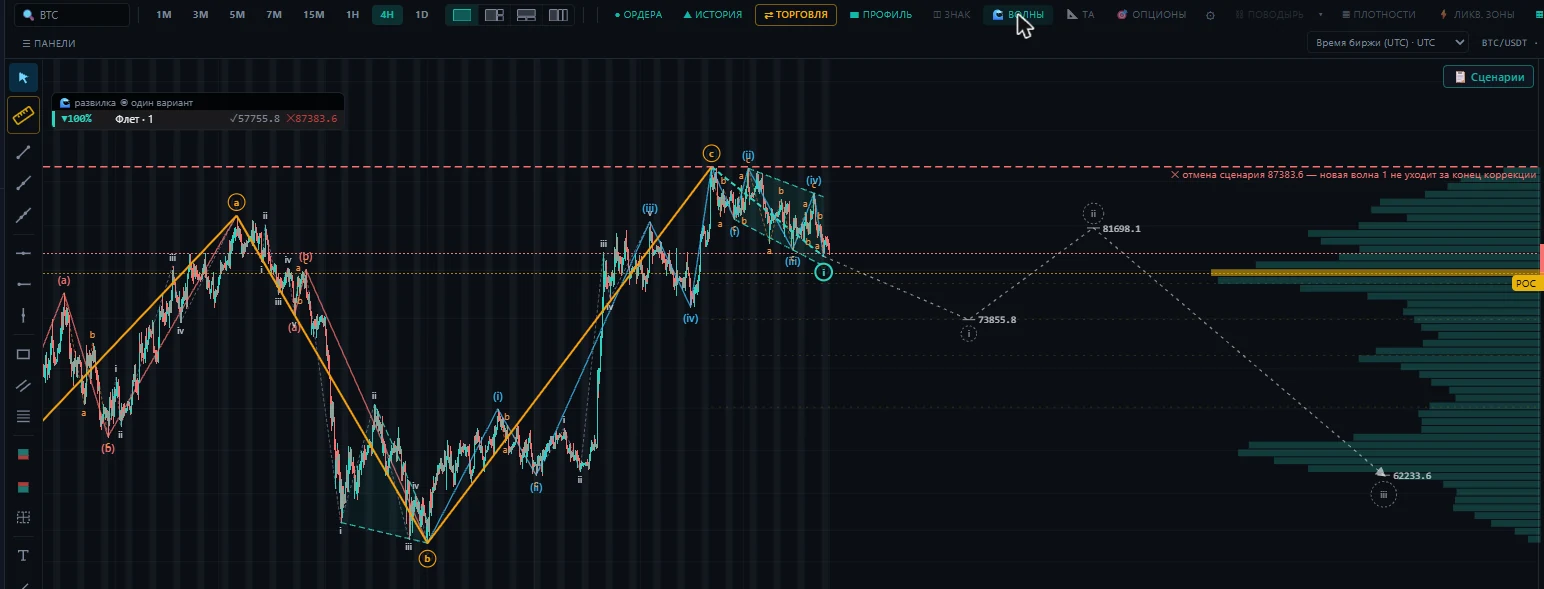
The wave scenario goes into the "Scenarios" card on the chart together with the screener and level scenarios. It always contains:
- which wave we're in now;
- the main scenario and the target;
- the invalidation level — the price after which the count is wrong.
The dashed line on the chart shows the expected price path. If the fifth wave has already passed the end of the third and the minimum target, the dashed line goes straight into a correction — because five waves are a reversal point.
The fork: all live alternatives at once
The market almost never reads as a single count. So in the top left of the chart (and on the "Waves" tab of the "Scenarios" card) there's a fork diagram: up to five different counts that don't break the rules — one row per alternative. There's one scenario per ticker across all timeframes: the larger pattern is counted from the 4-hour chart, and switching the timeframe doesn't change it.
- Each alternative has a share in percent: how much better than the others it fits the rules and guidelines. This is not a probability: on history, the main alternative called the direction correctly in half of the cases.
- ✓ number — "confirms": the last turning point the price needs to pass for the alternative to become the main one.
- ✕ number — "breaks": the invalidation level. Once the price passes it, the alternative is crossed out and the others' shares are recalculated.
- Above the list is the shape of the fork: one alternative, a clear main one, two close ones or fog. Fog means many almost equal alternatives: the waves aren't telling you anything right now, and nobody trades on them.
- ⚠ sharp move against the alternative — candles are moving quickly against it, and its share has been lowered. On history, such alternatives were right no less often, but were wrong by more (−1 ATR on average) — there are few cases so far.
Only the selected alternative is marked on the chart — click another row of the diagram and the markup changes.
Alligator
Bill Williams' three smoothed moving averages. Intertwined — the market is "asleep", there's no trend. Spread apart in order — a trend. In the "Fork", each alternative shows whether the entry condition is met: a closed candle has passed the confirmation level and closed beyond all three lines. To be honest: on our history this condition gave no advantage (63 cases, 43% correct). Use it as a "the market is awake" filter, not as a signal. The lines on the chart are turned on with the "show on chart" button.
Harmonic patterns
Turned on with the "show on chart" button on the "Waves" tab. MAMAY looks for the Gartley, Bat, Butterfly and Crab patterns — by the known proportions of the X-A-B-C-D points. "Complete" — point D is already there; "forming" — the price is heading toward the reversal zone. It's a hint about the place, not a signal: the entry comes on a reversal in the zone, the stop goes beyond the far edge of the zone.
Checking against bitcoin
For altcoins, MAMAY shows where bitcoin's main alternative is heading on the same timeframe and whether it agrees with the coin. Alts usually follow BTC: going against it is a reason to reduce the size.
My alternatives: mark it up yourself
In the "My alternatives" block, click ✍ impulse, ✍ correction or ✍ triangle and click the chart's peaks and troughs in order. A point lands exactly where you clicked; the "magnet" checkbox snaps it to the candle's high or low. Any point you've placed can be dragged with the mouse. The right button removes the last point, "done" or Enter saves, Esc exits. A saved alternative can be edited with the ✎ button.
MAMAY checks your markup against every hard rule: where it holds, where it's broken — and why. Alternatives are saved per ticker and timeframe. A star marks your main alternative (it's drawn brighter). You can copy, rename with a double click, hide or delete. They're stored only on this computer.